Posts

Showing posts with the label Teknologi

TTS Perkembangan Teknologi Produksi Pangan

Image
Teka Teki Silang tentang Perkembangan Teknologi Produksi Pangan ini sangat berguna untuk pembelajaran SD kelas 3 tema 7 sub bab 1. Caranya mudah tinggal klik kotak pada TTS di bawah ini, kemudian jawablah pada kolom yang sudah ada, ketik jawaban di situ, jika kesulitan menemukan jawaban bisa klik "solve" dan jika selesai bisa klik check puzzle di bawah TTS. TTS Perkembangan Teknologi Produksi Pangan TTS Perkembangan Teknologi Produksi Pangan TTS Perkembangan Teknologi Produksi Pangan This interactive crossword puzzle requires JavaScript and any recent web browser, including Windows Internet Explorer, Mozilla Firefox, Google Chrome, or Apple Safari. If you have disabled web page scripting, please re-enable it and refresh the page. If this web page is saved on your computer, you may need to click the yellow Information Bar at the top or bottom of the page to allow the puzzle to load. EclipseCrossword © 2000-2013 Welcome! Click ...

Cara mengetahui pesan wa (whatsapp) yang telah dihapus oleh pengirim

Image
Dalam kehidupan sehari-hari,   terutama bagi   yang suka mengucapkan aplikasi media sosial WhatsApp atau WA sering mendapati menerima pesan tetapi sudah dihapus terlebih dahulu oleh pengirimnya. Seperti gambar yang ada di bawah ini ! Ada beberapa penyebab   sehingga pengirim menghapus pesannya,   seperti   : a. Ada kemungkinan salah kirim ke WA kita sehingga pengiring perlu menghapusnya karena tidak sesuai pesan yang hendak dikirimnya. b. mungkin juga pengirim salah mengetik pesan yang menimbulkan perbedaan persepsi dari pesan yang diinginkan c.   pesan ternyata sudah dilaksanakan atau sudah terjadi,   sehingga tidak perlu lagi disampaikan kepada penerima pesan. Beberapa hal di atas menjadi alasan mengirim menghapus pesan yang dia kirim, kita sebagai penerima seringkali   merasa penasaran terhadap pesan yang dihapus itu.   Sehingga ingin mengetahui apa sebenarnya pesan yang terhapus itu. Ternyata ada cara yang bisa dilakuk...

How to make a Cool Photo in Writing Using an Android device

Image
When will upload photos to social media, often most of us need to add posts in the photo will be uploaded, such as to add captions or watermarks. This is quite necessary, because in addition to clarify the intent or ownership of the photos, embellishments and writing with a particular style or format can also be used to enhance your photos. Moreover, nowadays it is very easy to do. You don't even need to use a laptop or computer, as this can now be done using an Android device. How to make a Cool Photo in Writing via the Android devices 1. Download the application Snapseed from Google Play Store 2. open the application, and then tap on one of the sections on the main page of the application for opening photos 3. For ease when selecting photos, click on menu located at the top left hand corner on the pages of election photos 4. next, you can choose the application Gallery (provisioning device photo application) Of the application, select the image that will ...

The ranking of the most popular Social Media

Image
People's lives today is inseparable from social media. Almost everyone has social media accounts, even one person can have more than 1 account on different media. This is because each network offers different features and different range. Here is a ranking of the most popular social media that you should know. The most popular social network in the world As one website that offers ease to upload and play videos, YouTube ranked first as the most popular social media. Almost every person ever to access YouTube and more and more people are interested to be a YouTuber. In addition to entertaining, in fact social media is also capable of generating the money coffers. YouTube gives easy to play a video repeatedly. In addition, YouTube also provides a variety of different content so that users will never get tired to access this network.   Coupled with user friendly look, don't be surprised if YouTube get 43 percent of the vote according to Hootsuite. The ranking of ...

Tips on choosing the right Smartphone Casing

Image
Body, appearance and the look is so crucial for a smartphone. That's why, manufacturer of smartphone is not messing around in the Pack the product to be marketed. Even now they complement the products made with "armor" is strong and luxurious. It's just that, a strong design and luxury there are usually on Smartphones the middle class to the top, including the flagship range. So, could not expect much if you use smartphone middle class down, let alone the entry-level. Smartphone users for you guys mid-to-low entry-level or who want to taste the luxurious and powerful impression, can be overcome by using the casing. While the flagship smartphone user to you, of course the use of casing can be progressively enhance your existing smartphone in hand. But wait, before you buy the casing for the smartphone's pet, it is worth reading the 4 tips below. That way, you won't go wrong buying the casing and casing are bought are really not just beautify but also st...

How to create Photo 360 Degrees on all Android

Image
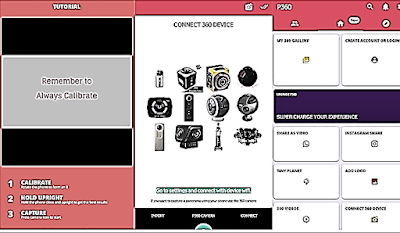
There are a lot of fashion photos that can be used in a smartphone, one of them is a photo 360 degrees. Camera 360 allows users to capture a photo in the form of 360 degrees, so it's not just the front area which is on the take. Although this feature is pretty interesting, not all smartphone that features a 360 in their default camera application. To address it, other applications are already available now on Google Play Store that can be used to take photos of 360 degrees. Application called Panorama 360 this 360 photos from being able to make all of the Android smartphone. How else is fairly easy, first download the application and install it as usual in the Android smartphone. Then do not forget to give permission is requested so that the application can run. Before you take a picture, make sure the position of the smartphone in a State portrait, then click Start Capture to begin with. To facilitate the user, there are hints of shooting that automatically appears ...

How to turn off the Story and Post Instagram others without Unfollow

Image
Social media as one of the most widely used current people, Instagram provides a variety of attractive features for sharing, like post photos or videos of one minute, InstaStories to the latest is IGTV. Specifically for Instagram Stories, this feature will appear at the top of the screen each time you open the home page app Instagram. Any sequence varies based on the how often do you guys visit the profile, send messages via DM, and other factors. You guys may never fret with a frequently makes Instagram account InstaStories, even up to tens of Story in one day. If you want to unfollow but felt bad because she is our old friend, you can hide the account Story Instagram easily. First of all open the app Instagram and search Story accounts that need to hide. Tap and hold the next two seconds until appears the notification and select Mute. Here you can choose to Mute Mute or story story and post it all at once. If the second select, automatically get the Story and Post the...

How To Fix A Broken Hp Charger Correctly

Image
Tips and tricks this time will review comprehensively about how to fix a broken hp charger that just maybe you guys are naturally at home. No doubt my friend all on knowing the name of the charger, this very important tool if there is certainly not all hp or smartphone user will not be able to turn on the gadget itself. Hp charger or a smartphone and there are so many types, ranging from its shape, port until the results of the voltage will be generated from the charger. In General hp charger or smartphone wear port micro USB USD or Type-C voltage results in approximately 1 to 3 ampere. But there's also that features fast charging, like the charger output is quite large. Discuss on Hp charger not a few gentlemen friends who are having problems such as a broken hp charger. The charger is broken can be caused a few things such as not caring for hp charger correctly. And for that, let's check out the following reviews, before that there's good buddy also knows what...

Otot buatan memberi 'kekuatan super' bagi robot

Image
Terinspirasi oleh teknik lipat origami, periset AS mengatakan bahwa mereka telah menghasilkan otot buatan yang murah dan murah untuk robot yang memberi mereka kekuatan untuk mengangkat 1.000 kali berat badan mereka sendiri. Kemajuan tersebut menawarkan lompatan ke depan di bidang robotika lunak, yang dengan cepat menggantikan generasi robot yang lebih tua yang tersentak dan kaku dalam gerakan mereka, kata periset. "Ini seperti memberi kekuatan super robot ini," kata penulis senior Daniela Rus, profesor teknik elektro dan ilmu komputer di Massachusetts Institute of Technology (MIT). Otot, yang dikenal sebagai aktuator, dibangun di atas kerangka kumparan logam atau lembaran plastik, dan masing-masing otot mengeluarkan biaya sekitar $ 1 untuk dibuat, kata laporan dalam Prosiding National Academy of Sciences, jurnal AS yang ditinjau sejawatnya. Inspirasi origami mereka berasal dari struktur zig-zag yang digunakan beberapa otot, memungkinkan mereka berkontraksi dan berk...